Photoshop CS5 greatly expands the toolset that Adobe offers in its flagship product, charting new ways to make image manipulation easier while making older tools work better than before. Don't worry about the lack of a new interface; the new ways to get your project done make this version a must.
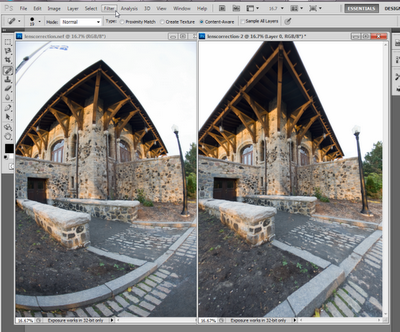
Photoshop has been in the English lexicon as a term to edit images for a long time, but the latest version of Adobe's flagship program stretches the canvas of manipulation much further than ever before. The look of the program has changed so little from Photoshop CS4 that users of that version should be instantly comfortable with this major update, but Photoshop Creative Suite 5 Extended gives photographers, artists, designers, and LOLcats obsessives a stunning array of new tools. Among the new features in Adobe's flagship image-editing software are automatic lens corrections, High Dynamic Range toning, automated editing tools, and significant improvements to creating 3D images.
Installation and setup
Photoshop installation is straightforward, although it does require an Adobe account. You can choose to purchase a license key immediately, which you will receive by e-mail, or try out the program for 30 days. When you receive your key, you can copy and paste the entire string directly from your e-mail into the first dialog box, and the other boxes will automatically populate. Both Photoshop CS 5 and the Extended come from the same 980MB installer for Windows, or 1.1GB on a Mac.
Depending on your Internet connection, Adobe says that users can expect download times of anywhere from 14 minutes on a corporate LAN to nearly 90 minutes on slower connections. On a Windows 7 computer with 2GB of RAM and a 2GHz processor on a T1, the download took around 40 minutes.
The Adobe installation process doesn't play well with Mozilla programs such as Firefox and Thunderbird, so those must be shut down before the installation can be finished. You can use other programs while installing, but CPU slowdowns are likely on many computers.
Adobe still refuses to have a Windows installation process that's respectful of standard program installation behavior. Associated program icons do not install into an Adobe folder in your Start menu, but are rather unceremoniously dumped into your Start menu's All Programs pane. First-time upgraders should note that Adobe will not override your previous installation of Photoshop, so you'll have to remove it manually. This may be annoying to some, but it's actually reasonable behavior given the cost of the program and the desire of many users to fully explore the trial. It would be nice if Photoshop came with a utility for removing previous versions, instead of having to go through the imperfect Windows uninstallation tool.
The installation and uninstallation frustrations aren't deal-breakers, obviously, but a little bit more attention here from Photoshop would result in a smoother process.
Interface
Unlike the dramatic interface overhaul that accompanied its predecessor, there's so little new to the look and feel of Photoshop CS5 that it's barely worth mentioning.
The Workspace switcher has been modified so that you can drag it out of the drop-down menu across the menubar. Doing so can push the menubar itself down to a second level, which might take up too much screen space for some people. Pre-existing workspaces can be deleted, custom ones added, and generally the workspace concept has gotten a bit more user-friendly.
Toolbox icons have been redrawn with a softer touch. This has the unfortunate effect of making them look mushy and out-of-focus against their gray background. At least the iconography is the same, so the spot healing brush tool still looks like a band-aid, but this was not a welcome change.
Despite lacking the aesthetic sensibility of its cousin Lightroom 3 (Windows|Mac), the overall layout of Photoshop remains consistent. It's not easy to use, nor is it hard to get used to the modular layout of adjustable panels. Further optional improvements can be made courtesy Adobe Labs' Configurator, for customizing some parts of the navigation. Although the CS4 interface improvements were appreciated, the UI is essentially mundane and in desperate need of refinement. It's sadly ironic that the premiere image editor looks like a cockpit.
Features and support
The new features in Photoshop CS5 completely sell the program. It's a bit hard to fathom that a program that's been around for 20 years continues to innovate and improve as much as Photoshop has, but this version of Photoshop, officially v12, doesn't just stretch itself here. It expands the limits of editing achievement, simplifying previously complex tasks and introducing new ones. It's not reinventing the wrench as much as it's making it do new things that everybody can immediately understand. This review won't cover all the new features and enhancements since there are more than three dozen feature changes alone, but we'll look at some of the best and most important.
The new Mini Bridge should directly affect every user's workflow. It opens a functional version of Adobe Bridge in a panel, speeding up processing by cutting down how often users have to jump out of the main Photoshop interface. Mini Bridge can be launched from the top of the interface to the right of the menubar, from the MB icon. As with any of Photoshop's panels, the Mini Bridge can be resized and moved around the window as needed.
On first launch, the Mini Bridge took longer than expected to read files before it could be used. After that initial sluggishness, it loaded smoothly, even after rebooting the computer. It was noticeably faster to launch images from either Bridge or Mini Bridge into Photoshop compared with the previous version, but sticking Bridge access directly into Photoshop is a long-overdue innovation.
What's new in this version
* Extraordinary painting effects
* Content-Aware Fill
* Complex selections made easy new
* Puppet Warp
* Superior HDR imaging
* Efficient workflow
* Better media management
* 3D extrusions with Adobe
* State-of-the-art raw image processing
* Enhanced 3D realism and rich materials
* Faster performance across platforms
* Streamlined creative reviews
* Improved 32-bit file support
Price : US$ 699.00
buy or not????
Download trial version...........
Total Downloads 15,060,133 http://download.cnet.com/Adobe-Photoshop-Extended/3000-2192_4-10011172.html?tag=mncol;1Enjoy!


